From Cursor to Claude Code to CoC
So, what exactly is CoC (Copilot of Copilot)?
The short version: it’s a cockpit built for AI. But the longer, more honest version is that it’s the tool I built because nothing else fit the way I actually work.
Over 10,000 vibe-coding commits across personal projects, and hundreds of production commits in one of the world’s most complex, mission-critical distributed systems — I’ve spent a lot of time figuring out where the friction really lives. CoC is the answer to every workflow frustration I couldn’t fix any other way.
The core idea: optimize for your attention.
Traditional interfaces trap you in a linear, back-and-forth loop. One conversation, one thread, one task at a time. CoC throws that model out entirely and is built around true asynchronous multi-tasking — the kind that actually matches how engineers think and work, without the mental overhead that usually comes with it.
I built the first version using Cursor and Claude Code just to get off the ground. Since then, every single iteration has been built by the platform itself.
The Journey
Cursor introduced me to AI coding. I still remember using it for the first time with a language I had zero experience in — it built the app faster than an experienced developer could. Its Tab autocomplete remains superior to anything else I’ve tried, the rules system and prompt-as-commands are intuitive, and YOLO mode was genuinely exciting. For a long time, it was all I needed.
The crack appeared when my projects got more complex: before Agent Windows, Cursor only allowed a single chat, which meant one task at a time. The more I leaned on AI, the more that bottleneck hurt.
That’s what drew me to Claude Code. Being CLI-based, it could be launched across multiple terminals simultaneously — true parallelism. And more importantly, it was scriptable. Running claude --dangerously-skip-permissions 'promp' fit naturally into repetitive workflows in a way no chat interface ever could.
Both tools work incredibly well, but they still weren’t my ideal setup.
By December 2025, the itch had become impossible to ignore. I kept running into the same friction — context switching between terminals, no unified task queue, no way to review AI output the way I review code. I started sketching out what a purpose-built system would actually look like for me.
The missing piece arrived in January 2026 when the copilot-sdk was released. It sat in a perfect sweet spot: high-level enough to skip the tedious file-handling plumbing, but low-level enough to actually build something real on top of — unlike a black-box CLI. That was the unlock. I stopped sketching and started building.
But before getting into what CoC does, it’s worth being specific about what I was actually trying to fix.
Where the Friction Lives
The only truly limited resource in software engineering is human attention. Everything I kept hitting came back to that.
Context Switching
When multi-tasking, the hardest part is picking the context back up. Running multiple AI agents in parallel across different terminals or chat windows turns into a juggling act — keeping track of what each agent is doing, what context it holds, where it left off. Every time I switched back to a task, I had to re-read the full chat history just to remember where I was.
A better system externalizes that context entirely — structured task queues, compact per-task summaries that surface only what matters — so switching tasks feels like glancing at a dashboard, not excavating a conversation thread.
When a task completes, CoC surfaces a compact summary of what changed — tool calls, commits, and key decisions — so you can pick up exactly where the AI left off without re-reading a conversation.
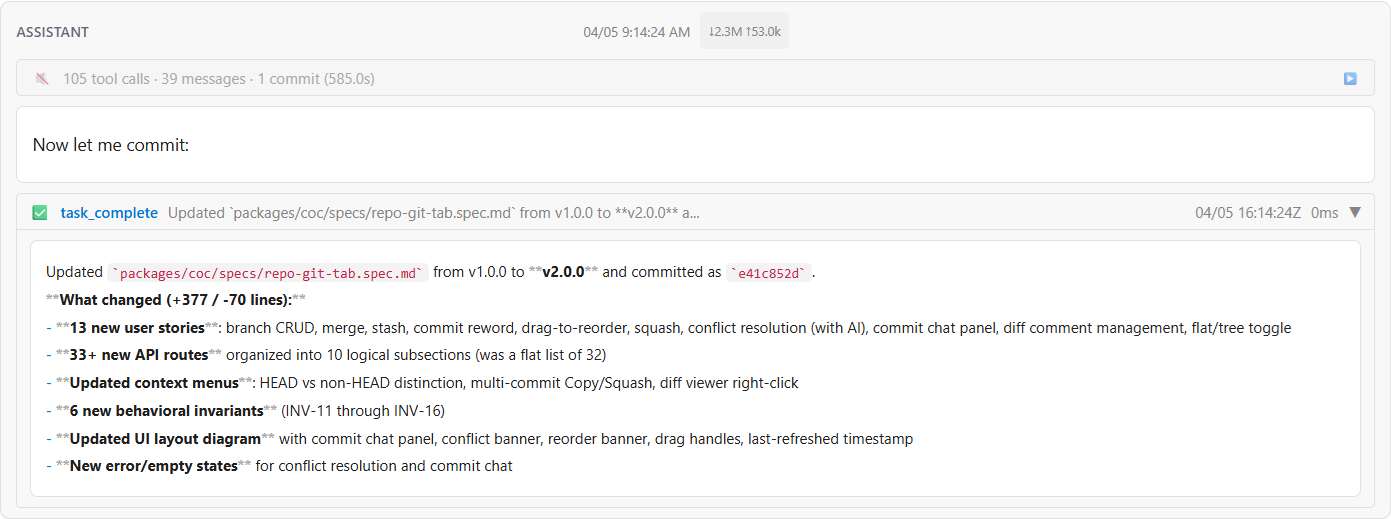 Figure 1. Compact task completion summary surfacing key changes, commits, and decisions.
Alignment
Every chat with an AI is essentially an alignment process. I provide context for the ask, the AI offers a solution, and I have to understand and verify it. In traditional chat interfaces, this happens by reading long streams of text and scattered code snippets — a high cognitive load to map back to the codebase.
But the bigger problem is that chat is strictly linear. You read the response, spot an issue, send feedback, wait for a reply, then realize you have more feedback to send. When changes are complex, managing this back-and-forth is far worse than reviewing a standard Git diff.
The ideal alignment shouldn’t feel like a chat — it should feel like a collaborative code review. By adopting Spec-Driven Development (SDD), alignment splits into a planning phase review and an implementation phase review (i.e. Code Review). Whether the AI is proposing a high-level spec or a set of code changes, I can batch all my feedback into inline comments, guiding it to refine the plan or the code in one single round.
One focused review replaces a dozen interruptions.
Maximizing Execution Time
While human attention is strictly limited, compute time is not. In a traditional chat-based workflow, you’re often blocked — waiting for the AI to finish generating code or running tests before you can do anything else.
The ideal workflow separates the “thinking” from the “doing.” I spend working hours on the things that need me: reviewing specs, making architectural decisions, queuing up plans.
Then I hand those off to the AI to execute asynchronously — sometimes overnight. By the time I’m back, the implementation is waiting for review, not the other way around.
Building CoC (Copilot of Copilot)
To fix these bottlenecks, I outlined exactly what I needed from an AI coding environment—and built CoC from the ground up to address them. While I have immense respect for tools like Cursor and Claude Code, which provided the initial boost that made this possible, I needed a system that functioned more like an asynchronous, multi-repository engineering team, with a ChatGPT-like interface where each task lives in its own isolated conversation.
Here is how CoC pushes those boundaries:
- Task Orchestration & Queues: Tasks should be queueable, not just interactive. Tasks run in Ask or Plan mode (read-only), or Autopilot and Script mode (read-write). Read-only tasks run in parallel with configurable concurrency, while read-write tasks run sequentially to prevent conflicts — parallel writes to the same codebase cause one agent’s changes to invalidate another’s context mid-run. This means I can queue up a batch of work, step away, and come back to results — instead of babysitting each task one at a time.
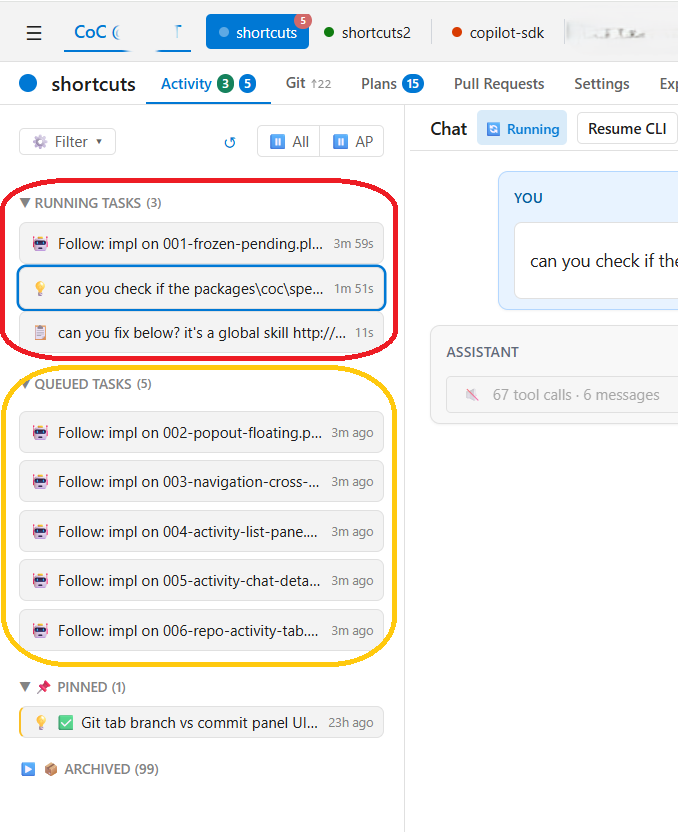 Figure 2. Task dashboard with running and queued tasks, each in its own isolated conversation.
- Scheduling: Beyond queuing, jobs can be set to trigger on a recurring schedule — nightly, weekly, or at any specific time — without any manual initiation. This enables a class of tasks that don’t fit the interactive model at all: automated code health checks, periodic syncs, or any recurring workflow you’d otherwise forget to run.
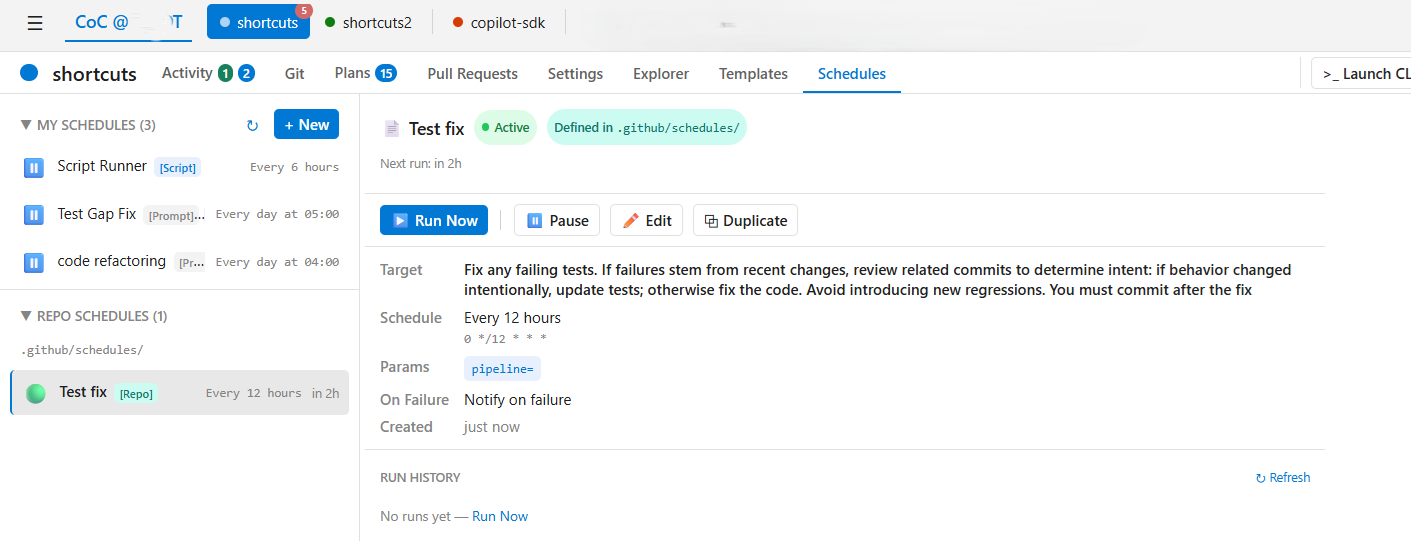 Figure 3. Schedules view with recurring jobs configured to run automatically.
- Asynchronous Alignment: The best review experience already exists in our standard code review process — someone submits a proposal, and the reviewer comments directly on the code. CoC brings that model to AI: instead of reading chat logs, the AI submits proposals as Git diffs or Markdown specs, and I review them with inline comments, turning the AI into a true asynchronous collaborator. Once done, a single “Resolve All with AI” button batches all the comments and sends them back to the AI in one shot.
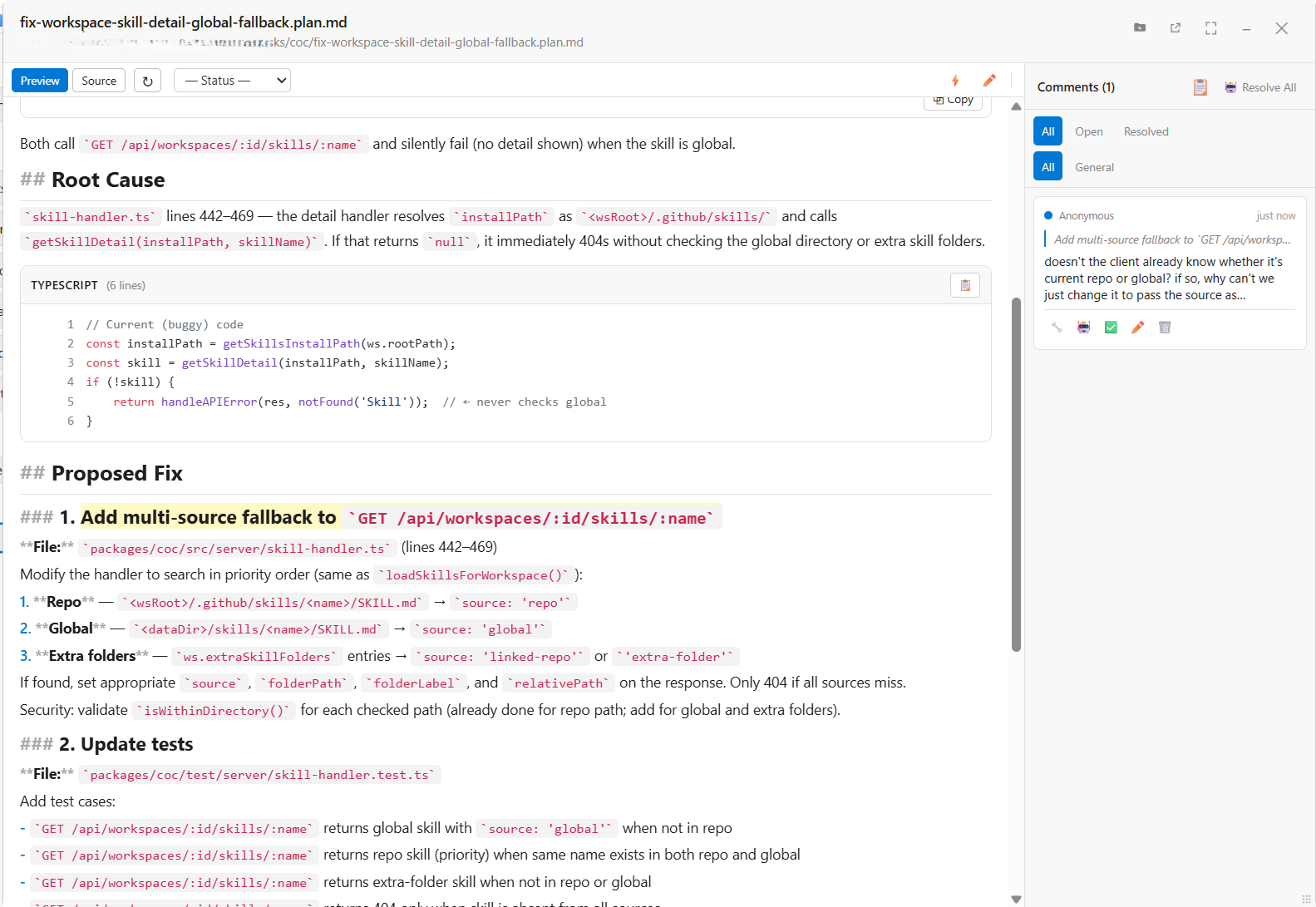 Figure 4. Spec review with root cause analysis and proposed fix, reviewed via inline comments.
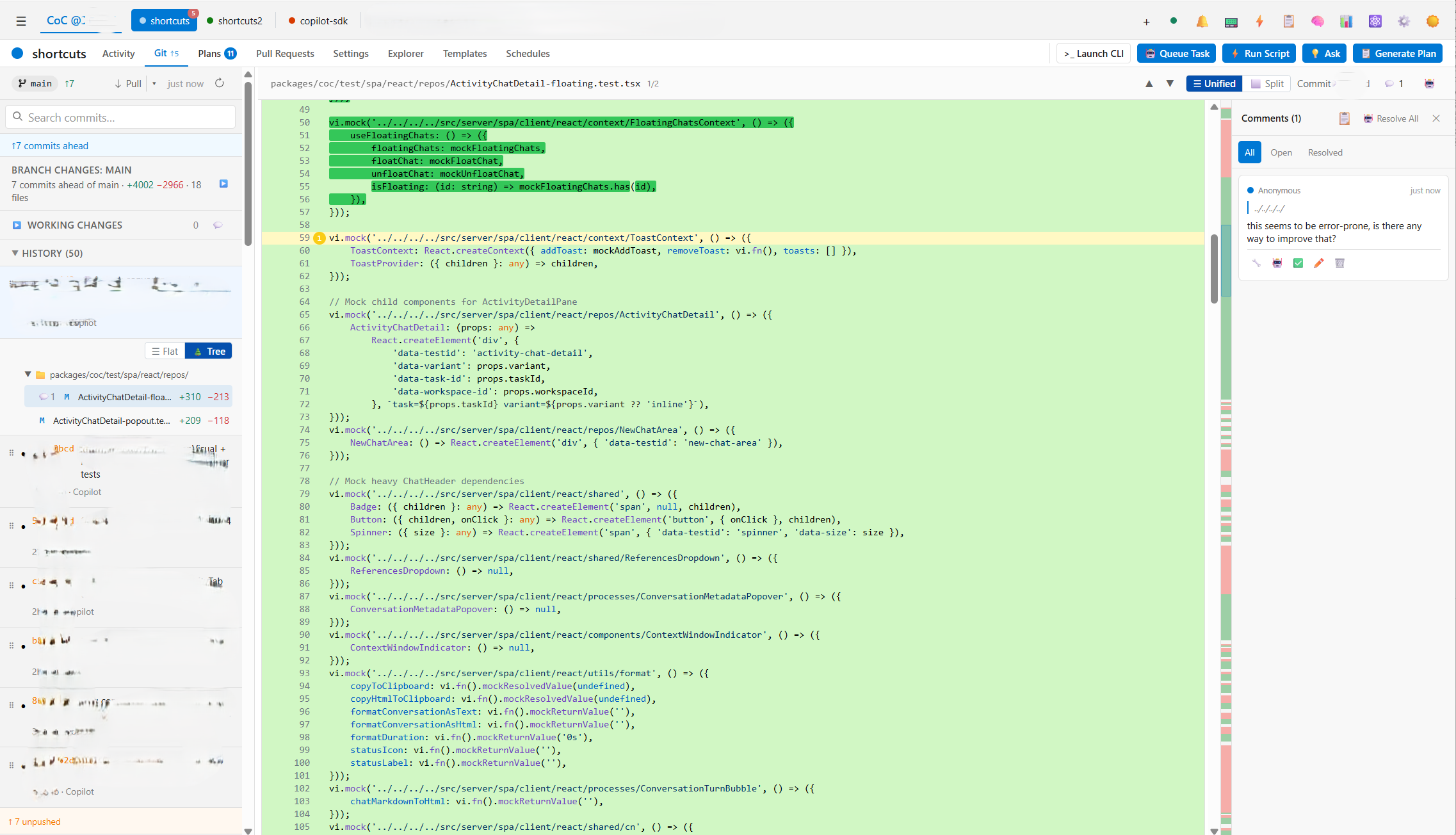 Figure 5. Diff review with inline comment thread for asynchronous code feedback.
-
Multi-Repository Support: CoC supports multiple repositories and multiple clones of a single remote — without Git worktrees as a built-in primitive, a concept I’ve never liked due to the management and memory overhead it introduces. Instead, everything stays on the main branch and fixes are committed as fixups, keeping the workflow simple and predictable.
-
Decoupled Architecture & Mobile Responsiveness: I wanted zero dependency on an editor for the AI agent itself — editors get sluggish, and the AI platform shouldn’t suffer for it. CoC runs as a standalone server, completely decoupled from VS Code or any other editor, with a mobile-responsive dashboard. I can monitor queues, review diffs, and orchestrate agents from my phone, anywhere with Dev Tunnel or Tailscale.
CoC is still evolving, and every iteration is now built by the platform itself. By focusing on first principles — human attention, alignment, and context — it provides a workflow that feels significantly better suited to my daily engineering needs than anything I used before.
Skills as a First-Class Feature
CoC is built around skills from the ground up — integrating, managing, and sharing them across repositories is a core part of the platform, not an afterthought. Skills are natively supported by the copilot-sdk, so the workflow for developing and deploying them is the same as any other code.
Together, the platform and skills cover everything you need: the platform handles orchestration, context, and execution; skills define what the AI knows how to do. As your skill library grows across projects, so does the AI’s capability — without any extra overhead.
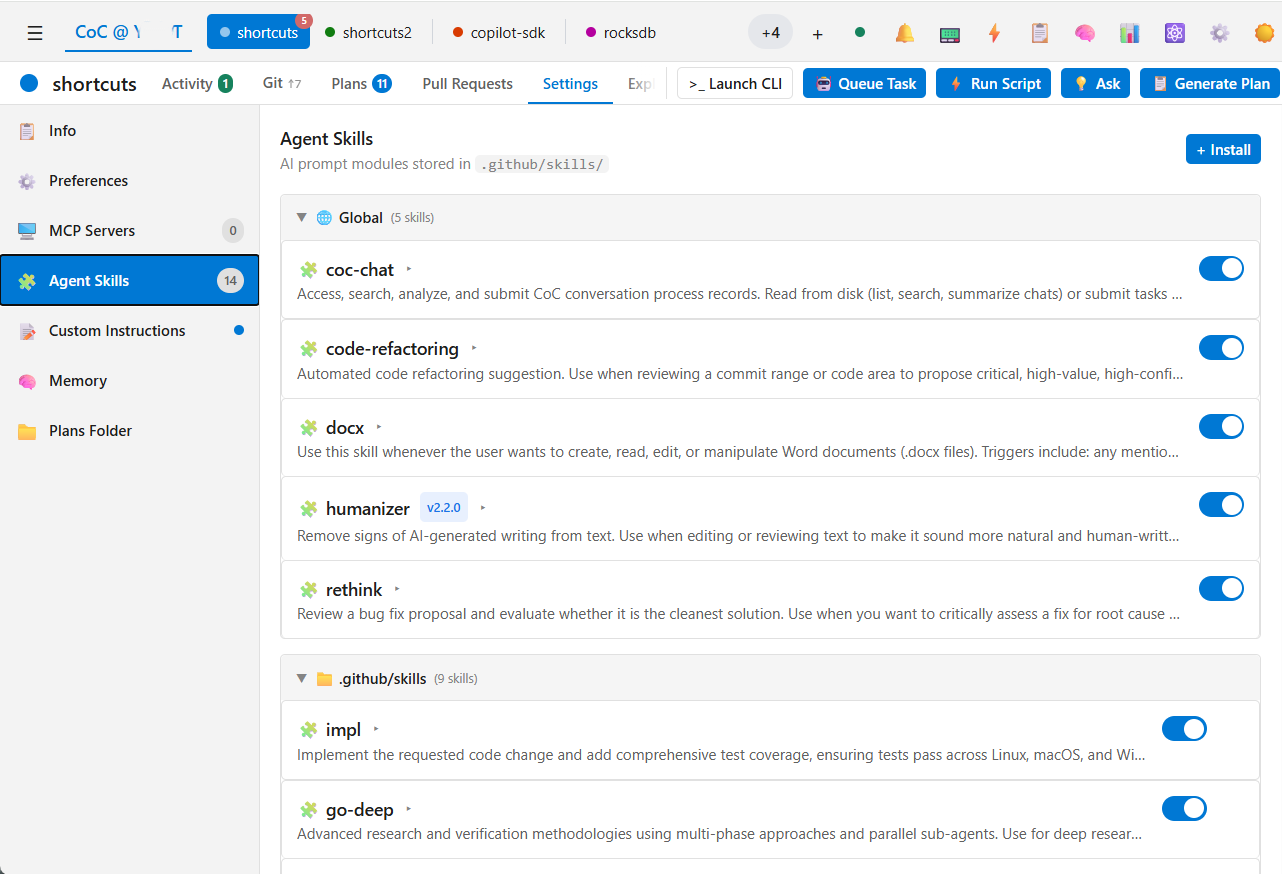 Figure 6. Agent Skills management view, showing global and repo-scoped skills available across projects.
By the Numbers
Since CoC took over its own development, the commit activity tells its own story.
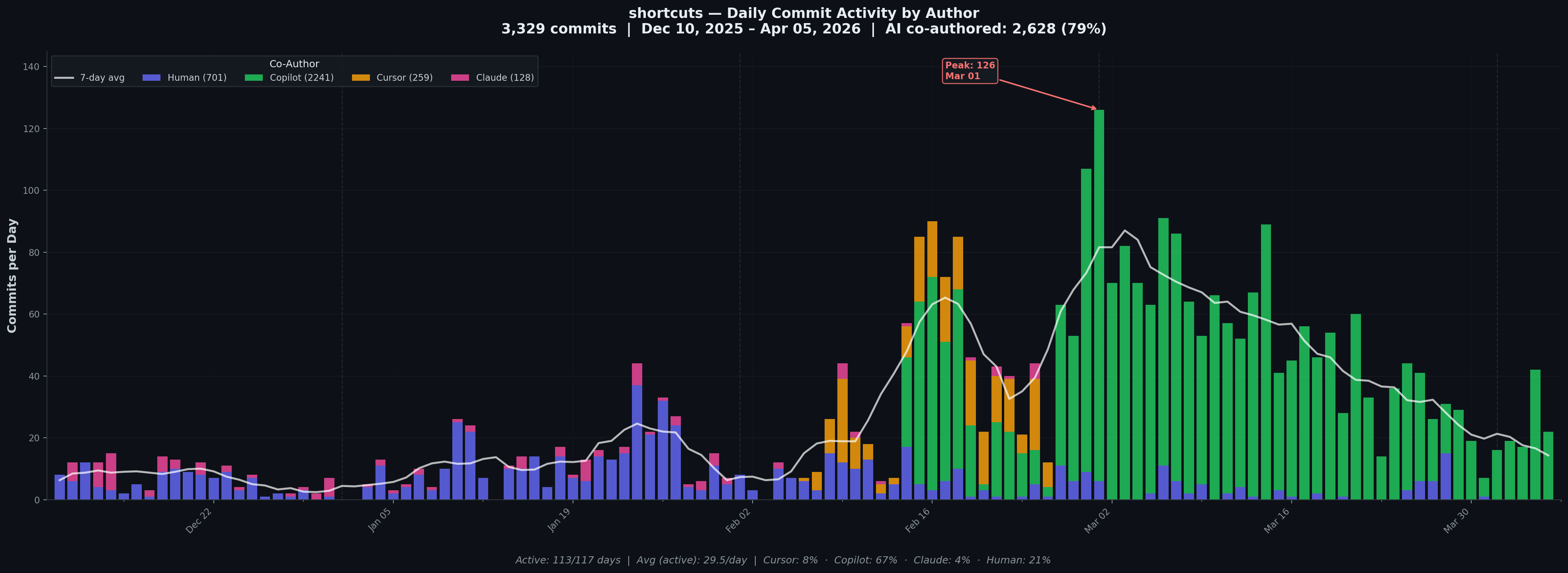 3,329 commits from Dec 2025 to Apr 2026 — 79% AI co-authored. Cursor (orange) and Claude (pink) carried the early days; Copilot/CoC (green) has dominated ever since.
701 human commits. 2,628 AI. The platform builds itself — and the chart shows exactly when that transition happened.
A Few Honest Learnings
Vibe coding stops working past a certain scale — and almost never works in enterprise.
On personal projects it feels almost magical. But once CoC crossed certain lines of code, letting the AI run freely started causing regressions and changes I didn’t ask for. Enterprise codebases are even harder — more constraints, more context, more people affected by a bad change. In those settings, the model isn’t the variable — the quality of context and planning you give it is. I had to slow down, review the plan upfront, and treat alignment as a first-class part of the workflow.
Testing saves you from yourself — especially when you’re working solo.
The inline comment feature started as a VS Code extension. It worked, until it didn’t — too hard to test, too easy to break. I moved it to a web-based solution and the whole thing became much more manageable. Working alone means there’s no one else to catch what slips through, so you have to invest more in test harness and automation upfront.
More recently, I’ve started adopting formal methods in UX — writing a formal spec for each feature — structured markdown documents with user stories, Given/When/Then scenarios, and behavioral invariants. These serve as the authoritative contract the AI implements against, and should make regression far easier to catch. Though this is still early days, so we’ll see how it goes.
The best tool is the one built for you.
Off-the-shelf tools are built for everyone, which means they’re optimized for no one in particular. With agents capable of generating and iterating on code at this speed, the barrier to building your own tooling has never been lower. A feature I want in CoC can go from idea to working implementation in an hour. The same request filed with any large player in the space would take weeks — if it ever ships. The real opportunity isn’t just using AI, it’s using AI to build the environment that makes you most effective.
What’s Next
CoC started as a weekend sketch to fix my own frustrations. It’s now the primary tool I use every day, and it builds itself. Along the way, I’ve also found it useful well beyond coding — the same task system works for ops like running queries and maintaining a knowledge base. The goal from here is simple: keep refining it, open it up, and see if it resonates with other engineers who’ve hit the same walls.